470-800 MHZ is television reception band frequency , so we calculate Center frequency = 635 MHZ
Enter this centre frequency to the Geometry calculation 4nec2 software :
0.472 meter is lambda/2 for 635 MHz according to software .
0.009 is radius of wire in meter , equal to 9 mm pipe radius, made from copper
then calculate the formula by clicking F7 or go to calculate menu, then click NEC output data. The result is :
SWR still high 10.3 , we must re calculate for finding the best SWR, SWR wanted between 1.1 until 3 . And this is only sample for designing using 4NEC2 software for dipole antenna.
The Power output antenna also 3.94 dBi and the pattern antenna shows beside Main windows calculation.
This is 2D view of antenna with current propagation
This is 3D view of antenna pattern , with x,y,z cartesian with Power maximum at 3.87 dBi
3D view of antenna Zoom in
3D view of Vertical Gain calculation antenna
Current View of Antenna with Hide Pattern in Horizontal Propagation
3D Multicolor view of antenna with current propagation
3D Horizontal Gain with Current propagation in Horizontal view
2D Slices with horizontal current
Vertical gain antenna with current pattern
Vertical gain antenna with current propagation,
Find the best antennas for TV, radio, and wireless. Compare top antenna deals, use free antenna calculators, follow DIY guides, and buy high-performance antennas with confidence.
Antenna Modeler and Optimizer using 4nec2 software
For antenna design model and optimize the design for analyse and calculate pattern and calculate Power of Receive and Transmit Power of antenna , I am using free and open source antenna modeler and optimizer 4nec2 from Arie Voors.
You can download in here http://www.qsl.net/4nec2/
or Download from my GDrive
4nec2 support Windows operating systems and also Linux by installing Wine Software before installing 4nec2.
Feature from 4nec2 software : I get this from http://www.qsl.net/4nec2/ :
* Graphical 2D and 3D visualization of Far- and Near-field data and Geometry strutures (including circular polarization view).
* Line-chart visualization for freq-sweep Gain, F/B, F/R, SWR and impedance data. * Drag and drop style Geometry Editor to assist the starting antenne modeller.
* Full Nec2 and Nec4 command support, including GX, GM, GR, GA, GH and surface patches.
* Capable of running up to 11000 wires and/or segments (limited by the max of 2Gb of windows on-board memory)
* Support for inclusion of surface-wave component in far-field data. * 3D geometry display for surface patches included.
* Variable substitution included for complete Nec2/4 command set enabling you to model by equation. * Sophisticated real-time 3D geometry and pattern viewer showing real wire-radius.
* AO-style gradient/hill-climbing optimizer included.
* Genetic Algorithms based optimizer included.
* Automatic variable sweeper with line-chart output.
* Automatic convergence tester with line-chart output.
* Interactive Smith chart visualization for freq-sweeps.
* Integrated Sommerfeld ground calculations with frequency-sweep.
* Automatic generation of VOACAP propagation prediction type 13 and –14 antenna files.
* Automatic coversion of AO (*.ant)and EZnec (*.ez)input files.
* ‘Insulated-Wire’ and 'LC-trap' loading-types included.
* Automatic conversion for feet, inch, #awg to meters and elevation/azimuth to phi/theta and reverse.
* Batch processing for automatic testing, calculation and/or conversion of multiple Nec, AO and/or EZnec input-files.
* Extensive segment- en geometry validation, such as: Intersecting volumes, Short/thick wires at sharp angle, Unequal segmentation for parallel wires, Too low hight, Large radius or length changes at junctions, etc.
* Screen grabber for easy cut/paste, print or save parts of the screen, window or form. * Geometry builder to create cylindric, patch, plane, box, helix and parabola shaped structures using auto-segmentation and/or equal-area rules.
* Automatic generation of Stub-, L-, Pi- and Tee-matching-networks (low- and high-pass)
* Visualization of circular polarization components E(left) and E(right) for far-field. * EZnec style MiniNec ground included.
* Capable of running the default Lawrence Livermore National Laboratories Nec4 engine.
* Running on all systems from early Windows-95 to latest Windows-Vista * More than 450 example files
* Context sensitive Help-file.
* Completely free.
For tutorial 4nec2 you can get free on http://www.qsl.net/4nec2/Tutorial_4NEC2_english.pdf , I will also writing the tutorial for you with different example and different antenna design.
The example will talking about design 300 MHz antenna with SWR 1.48 , and wavelength 0.999 meter and input power antenna 100 Watt. See at the picture below from 4nec2 software :
On The example we can get information about frequency 300 MHz, wavelength 0.999 meter , SWR 50 1.48 , efficiency 97.53 % , antenna wire on xyz position and we can also can see smith chart calculation
Antenna Pattern also can be view from the software :
And also 2D and 3D antenna simulation signal from antenna , can be calculate and view by this software :
3D Zoom Mode
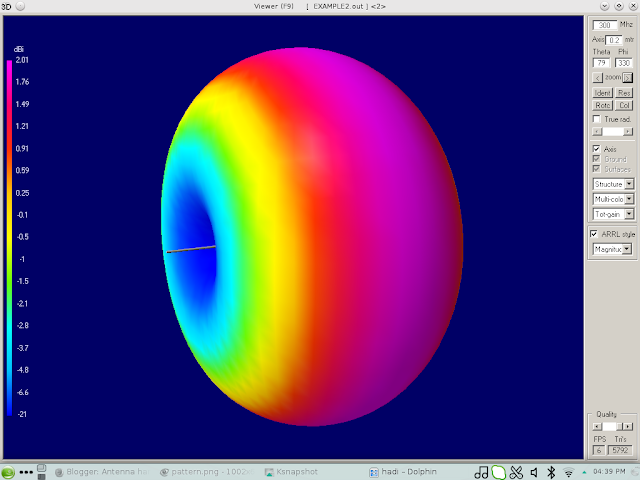
2D Mode View
Current Mode View
Vertical Gain View
Horizontal Gain View
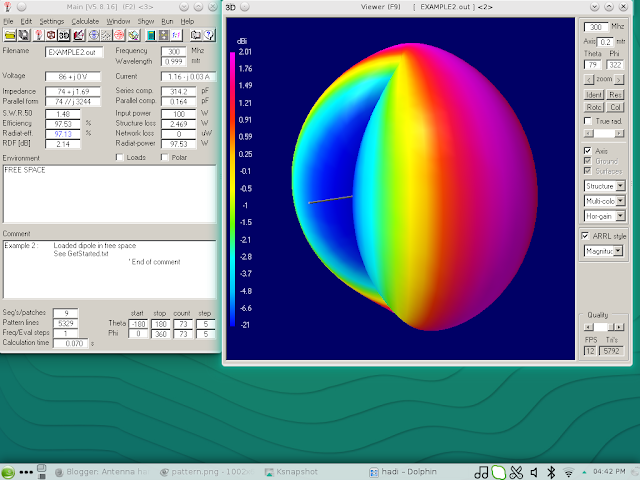
Pattern Gain View
Phi Theta View Gain
3D Sense View
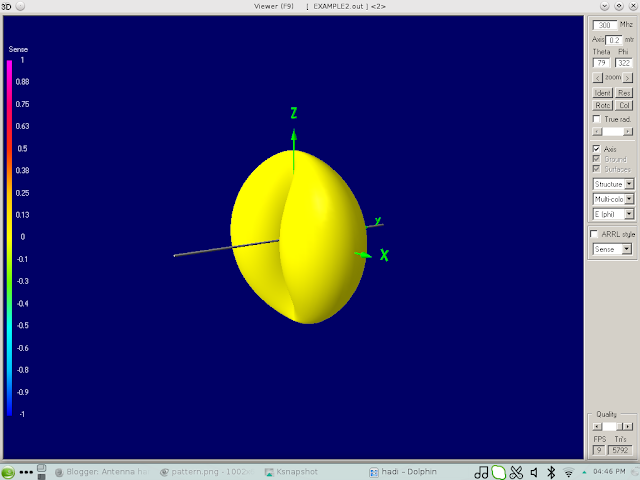
Tilt Phase View
Transparent View
Vertical Gain View
4nec2 support Windows operating systems and also Linux by installing Wine Software before installing 4nec2.
Feature from 4nec2 software : I get this from http://www.qsl.net/4nec2/ :
* Graphical 2D and 3D visualization of Far- and Near-field data and Geometry strutures (including circular polarization view).
* Line-chart visualization for freq-sweep Gain, F/B, F/R, SWR and impedance data. * Drag and drop style Geometry Editor to assist the starting antenne modeller.
* Full Nec2 and Nec4 command support, including GX, GM, GR, GA, GH and surface patches.
* Capable of running up to 11000 wires and/or segments (limited by the max of 2Gb of windows on-board memory)
* Support for inclusion of surface-wave component in far-field data. * 3D geometry display for surface patches included.
* Variable substitution included for complete Nec2/4 command set enabling you to model by equation. * Sophisticated real-time 3D geometry and pattern viewer showing real wire-radius.
* AO-style gradient/hill-climbing optimizer included.
* Genetic Algorithms based optimizer included.
* Automatic variable sweeper with line-chart output.
* Automatic convergence tester with line-chart output.
* Interactive Smith chart visualization for freq-sweeps.
* Integrated Sommerfeld ground calculations with frequency-sweep.
* Automatic generation of VOACAP propagation prediction type 13 and –14 antenna files.
* Automatic coversion of AO (*.ant)and EZnec (*.ez)input files.
* ‘Insulated-Wire’ and 'LC-trap' loading-types included.
* Automatic conversion for feet, inch, #awg to meters and elevation/azimuth to phi/theta and reverse.
* Batch processing for automatic testing, calculation and/or conversion of multiple Nec, AO and/or EZnec input-files.
* Extensive segment- en geometry validation, such as: Intersecting volumes, Short/thick wires at sharp angle, Unequal segmentation for parallel wires, Too low hight, Large radius or length changes at junctions, etc.
* Screen grabber for easy cut/paste, print or save parts of the screen, window or form. * Geometry builder to create cylindric, patch, plane, box, helix and parabola shaped structures using auto-segmentation and/or equal-area rules.
* Automatic generation of Stub-, L-, Pi- and Tee-matching-networks (low- and high-pass)
* Visualization of circular polarization components E(left) and E(right) for far-field. * EZnec style MiniNec ground included.
* Capable of running the default Lawrence Livermore National Laboratories Nec4 engine.
* Running on all systems from early Windows-95 to latest Windows-Vista * More than 450 example files
* Context sensitive Help-file.
* Completely free.
For tutorial 4nec2 you can get free on http://www.qsl.net/4nec2/Tutorial_4NEC2_english.pdf , I will also writing the tutorial for you with different example and different antenna design.
The example will talking about design 300 MHz antenna with SWR 1.48 , and wavelength 0.999 meter and input power antenna 100 Watt. See at the picture below from 4nec2 software :
On The example we can get information about frequency 300 MHz, wavelength 0.999 meter , SWR 50 1.48 , efficiency 97.53 % , antenna wire on xyz position and we can also can see smith chart calculation
Antenna Pattern also can be view from the software :
And also 2D and 3D antenna simulation signal from antenna , can be calculate and view by this software :
3D Zoom Mode
2D Mode View
Current Mode View
Vertical Gain View
Horizontal Gain View
Pattern Gain View
Phi Theta View Gain
3D Sense View
Tilt Phase View
Transparent View
Vertical Gain View
How To Build SOHO Small Office Home Office with free software and small budget ?
The SOHO (Small Office Home Office) Design with 12- 20 Employee or user
As in digital business era, small office or home office be required using computer and printer for easy correspondence inside and outside office to contact another company, or customer, making letter, report, and electronic mail etc.
This also required computer Network for sharing Printer and another Network Equipment for low cost.
As we know open sources is community of developer and provide many option of software that can be used for building small office or home office with small business that can reduce cost for providing Network in his/her office with quality same as, and more than others software that must be paid.
For this reason it needs education for The office owner and IT Team , also employees who using this advantage of open source for daily activity in office.
For this purpose We will needs this material :
Computer / Desktop as Server
Printer
Router
Modem
Notebook / Desktop with Wi-Fi card inside
Software :
Ubuntu Linux Operating System Server
Ubuntu Linux Operating System/Chrome OS for desktop/notebook (Same function as Windows 10/8/7)
Libre Office or openoffice for Notebook and Desktop (same function as Microsoft Office)
Kmail (Same function as Microsoft Outlook )
Thunderbird/Mozilla as Browser
Many Opensource software you can maximize using it for start a small business or office with free of charge.
These all software you can get free of charge, the cost will appear on Computer , Printer, Wireless Router, Modem from ISP (Internet Service Provider), Monthly Internet Billing, and Notebook.
Implementation
Download Ubuntu Linux Server here
Download Ubuntu Linux OS/Chrome OS for Desktop/Notebook
Notebook Lenovo Chromebook Flex 5 2-in-1 Laptop
Do not Throw your Old Computer
If still have an old computer PC with i386 Processor, maybe you can still used it and take advantage from this old computer with open source software.
You can install Unix Operating System such as FreeBSD Unix or Linux Operating System.

The hardware minimum system for Installing Free BSD is :
32bit x86 Intel Processor such i386, 80486 or higher CPU with minimum 64MB RAM or 128MB RAM with 1.5 GB hard drive memory.
amd64 Processor , inlcude AMD Athlon, AMD opteron , multi core Intel xeon, and Intel core 2.
While for Linux Operating System support Processor Intel 80386, 80486, Pentium, Pentium Pro, Pentium II, Pentium III CPU, these includes processors such 386SX, 486SX, 486DX, and 486DX2, included Cyrix Processor and AMD Processor.
The Advantage of Old computer is for small business industry and home small business owner , you can have low cost for software and hardware budget for running your business. You can email, browsing, also make spreadsheet calculation and financial plan and accounting also office function can be done with Libre Office , and printing also can be done. Simplify this, you can have your own business office with old computer and old printer, also you need router for connecting to Internet.

For Example I used Opensuse Linux for my notebook. So I do not have to worry about copyright issue software. Because all software that I need for working in home are open source such as Libre Office, KMail, etc.

This is capture from my notebook , I use opensuse for Operating System.
You can install Unix Operating System such as FreeBSD Unix or Linux Operating System.

The hardware minimum system for Installing Free BSD is :
32bit x86 Intel Processor such i386, 80486 or higher CPU with minimum 64MB RAM or 128MB RAM with 1.5 GB hard drive memory.
amd64 Processor , inlcude AMD Athlon, AMD opteron , multi core Intel xeon, and Intel core 2.
While for Linux Operating System support Processor Intel 80386, 80486, Pentium, Pentium Pro, Pentium II, Pentium III CPU, these includes processors such 386SX, 486SX, 486DX, and 486DX2, included Cyrix Processor and AMD Processor.
The Advantage of Old computer is for small business industry and home small business owner , you can have low cost for software and hardware budget for running your business. You can email, browsing, also make spreadsheet calculation and financial plan and accounting also office function can be done with Libre Office , and printing also can be done. Simplify this, you can have your own business office with old computer and old printer, also you need router for connecting to Internet.

For Example I used Opensuse Linux for my notebook. So I do not have to worry about copyright issue software. Because all software that I need for working in home are open source such as Libre Office, KMail, etc.

This is capture from my notebook , I use opensuse for Operating System.
And for Using Printer, We use share printer in the home network. Although the Server we use still using Windows OS 7 , because it is not belong to me. But The Ideas of this plan is to reduce or minimize your SOHO or small business from taking his/her budget from capital for buying expensive system of small hone network computer. And you can still save your budget for other used.
And here it is how I setting my notebook connecting to Wireless printer outside of my room.
I am using Motorolla Modem, TPLink Router, Sony Vaio Notebook and PC Intel Computer
4G LTE 4 Pole Inter Digital Filter for Digital TV
This is the design of 4G LTE filter for Digital TV . As we know some of 4G LTE transmit frequency , overlapping with Digital TV reception frequency on 698 - 806 MHz. So, this 4 Pole Inter digital Filter made from aluminium plate and copper rod. You can experiment with it , I am not tested yet, for another design you can follow from VK3UM software online at VK3UM.com
LM 335 Temperature Sensor Circuit
Temperature Control
Circuit :
The temperature
controller circuit using +5 V voltage source from I/O slot at IBM
PC/XT/AT.
IC LM 335 from Texas
Instrument have the ability to detect temperature from ranging -40
celcius degree until 100 celcius degree.
This LM 335 from
Texas Instrument , is zener diode which have the linear coefficient
voltage increment related with increment of temperature with formula
:
Vz = + 10 mV/
C (celcius degree) , with
current opeartion between 400 uA until 5 mA.
On
the circuit Resistor 2.2 K use for limit the current flow to cathode
pin from LM 335 which is output of LM 335 sensor temperature.
On
circuit Resistance of R is 2.2 K , and at 25 Celcius degree from data
sheet of LM 335 , voltage at LM 335 will be 2.982 Volt , so current
flow can be calculate :
Vcc
= + 5 V
Voltage
at 25 Celcius on LM 335 = 2.982 V
Voltage
at Resistor R 2.2K is = 2.018 V
Current
flow through LM 335 and R will be = 2.018 V / 2.2 K = 0.9 mA
This
0.9 mA current at LM 335 still on at range of sensor LM 335, and then
the output cathode pin of LM 335 sensor from Texas Instrument connect
to input 0 of ADC0809 Analog and Digital convertion data from Texas
Instrument at pin 26.
Temperature Sensor LM 335 from Texas Instrument
Temperature Sensor
using IC LM 335 from Texas Instrument. LM 335 is Zener Diode which
sensitive of temperature change in it surrounding , which is reverse
bias on it breakdown area with output :
Vz = [10 mV/Kelvin]
…..........[2-1]
Because there is gap
different 273 degree between Kelvin and Celcius , so the output in
Celcius for LM 335 from Texas Instrument will be :
Vz = 2.73 Volt + [
10 mV/Celcius] T.........[2-2]
where T is in
Celcius Degree
IC LM 335 from Texas
Instrument have temperature range between -40 celcius degree – 100
celcius degree
I use LM 335 in
Plastic Package TO-92 , another package for LM 335 is SOIC
Images courtesy Texas Instrument
Another IC
temperature sensors from Texas Instrument are LM135, LM135A with
TO-46 package, LM235 and LM235A in TO-92 package and LM 335 and LM
335A in SOIC package.
From this writing, I want to discuss about Simulation control system with IBM PC
XT/AT for Temperature, heater, and pump using LM 335 as sensor, PIO 8255, ADC 0809 , MOC from motorolla , and TRIAC .
This control system operate with software with QBasic , and I will write the schematic diagram, implementation, and software design.
For more data about LM335/LM335A . please visit data from Texas Instrument , here
Subscribe to:
Comments (Atom)


