Antenna Handbook | Best Antennas, Free Calculators & Top Antenna Deals

How To Optical Fiber test Measurements Using OTDR ?

Optical fiber cables are tested for attenuation using the cut back method or back reflection method . The cutback method is mainly used in test at the manufacturing facility and the back reflection method is normally used in the field and in the manufacturing facility for some tests. An optical time domain reflectometer (OTDR) is the portable optical test set used in the field for pre- and post construction fiber measurements. The backscatter concept is illustrated in Figure 1

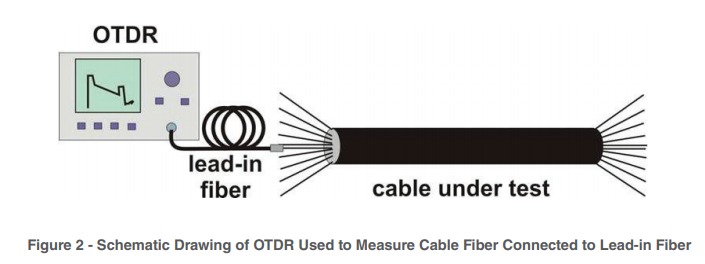


A lead-in or launch fiber is used to eliminate the effect of dead zone created from the OTDR fiber interface connector. A lead-in fiber is a fiber several hundred meters in length that connects the OTDR to the fiber being measured. It provides a useful fiber trace for the entire length of fiber under test. Since it provides backscatter power leading into and out of the initial fiber connection in the fiber undertest, a more accurate measurement of fiber length and total end-to-end loss can be made. The lead-in fiber is a commercially available OTDR accessory with a connector on one end to match the OTDR network interface and a connector on the other end to match the connector encountered on the fiber under test or in this case a bare fiber with a mechanical alignment fiber connector, such as an elastomeric lab splice. Lead-in fibers are useful to locate short distance faults and making loss/attenuation measurement in real time mode. This document explains howto use lead-in fibers.
One of the OTDR equipment come from Fluke Networks

Measurement Procedure.

Block Diagram 

This is a schematic diagram of testing optical fibers using an OTDR with a lead-in or a launch fiber.

Procedure 

Connecting Dummy Fibers / Pigtails to OTDR: Clean optical connector in end of lead-in fiber that will mate with the OTDR using isopropanol and lint free wipers. Connect it to the OTDR output so that a fiber trace can be observed. A square peak on the fiber trace (see Figure 3) will mark the start of the trace. Next to this peak OTDR traces should be a smooth with a continuous slope. Adjust the connector to obtain the OTDR trace as shown in Figure3.

What is eero home wifi system ?


eero is smart wifi system that replace traditional wifi router, wifi extender and internet booster in One device eero system . eero works with eero TrueMesh Software App. 


Unlimited Mesh 
With TrueMesh, WiFi hops between eero devices to travel down hallways or go around walls. Most other WiFi systems only allow for one hop in any direction — so something as simple as a wall can mean that your devices can’t get the WiFi they need. eero allows for more hops with less speed degradation — so you can cover any home and navigate around any obstacle.

Solving Congestion


TrueMesh technology knows the signal strength between each eero in your home and calculates the best path from your device to the internet. If there’s a disruption on any part of your network — like if a pet knocks a Beacon out of the wall — TrueMesh dynamically reroutes traffic to keep it balanced. All this happens in the background so you don’t notice a thing.

Automatic Software updates
Normal routers require you to proactively install security patches — but let’s be honest, most of us never do that. eero automatically updates its encryption and security protocols to protect your network from the newest threats. You always have the latest features and security.

Control at Your Smartphone
With WiFi App by installing TrueMesh App,your network speed, which devices are connected and make sure each eero working properly.  you can control all the eero function with your Smart Phone, works with Alexa, Amazon WiFi

Placing Additional eero


The eero app walks you through placing additional eero devices in your living room, bedrooms, kitchen, or hallways to bring WiFi to every inch of your home.

Optimize Your Home

From when your start activated eero,  eero TrueMesh software begins learning from and optimizing for your space, devices, and network usage. So every device gets a reliable connection all the time, everywhere in your home.

eero come with 3 type :

eero is WiFi router and extender, and covers area up to 1,500 sq.ft

is tri band WiFi Router and Extender by cover area up to 1,750 sq.ft


is WiFi Booster for expand your wireless coverage capability up to 1,500 sq.ft

With 3 pack eero as technical spec from eero, you can get covers area up to 5,000 sq.ft , this suitable for common house in America and Canada.
You can change the eero  by mixed it as your coverage needs. 

For example if you have house with 3000 sq.ft , you need 1 eero and 1 eero Beacon, or 1 eero Pro, and 1 eero Beacon.

DIY Six Stage Attenuator for High Frequency HF

If you have to deal with radio frequency more than very rarely, it is helpful if you can easily weaken the signals in discrete steps. 

So you can e.g. Bring the output signal of an HF generator to a different level than would only be possible with the generator's adjuster. 

There are many applications for a concealer when comparing or repairing receivers or with radio devices. Unfortunately, professional attenuator are quite expensive. 

Doing it yourself is worthwhile here because expensive electronics are not required
The Circuit Diagram of Six Stage Attenuator from Elektor Elektronic July Edition 2017 in Germany language 

Circuit Diagram


PCB Lay Out

Final Six Stage Attenuator Prototype with aluminum case


With Six Stage Switches for 0..31 dB in 1 dB Step
Prototype Final

Frequency Response 0....-31 dB


Radio Straight or Crystal Radio for Science Project or Hobbyist


OA70 / IN34 / IN60 is Germanium Radio, choose only one type.
Antenna high from Ground is high is possible, ground is a must to Steel Water pipe, or making one from a piece of copper approximately 1 meter down to the ground, so will be voltage between ground and radio wave pick up by antenna.

I have build this Radio and connected input speaker to line input notebook and running with Open Lab software and can pick up Radio Signal from about 6 km air distance.

====+  Parts List for   +====

10 nF                              1   Capacitor


VC 500 pF                      1   Variable Capacitor


OA70/IN34/IN60             1


 GND                               1   GND
Termination Ground

108 Turns,12 Turns        L Tap between 108 Turns and 12 Turns

8-2000 Ohm  1   SPKR or Earphone 8 - 2000 Ohm , you can get this in junk shop or at ebay.com

RF Connector Male and Female For Antenna Connection
 

50 Ohm Coaxial cable for Antenna


Electronic Project Box


Antenna for LW,MW,SW and AM 

Sun Switch With Transistor 2N3055


2N3055 is Power Transistor and Amplifier Transistor for General Purpose and can act as Photo Transistor by cutting the "hat cover" of this transistor. This photo transistor function of 2N3055 can be taking the advantage as switching function with transistor. This circuit using 2 transistor which is 2N3055 and BD139. If there is no sun light or the light is not enough for Transistor 2N3005 to deliver, so R1 will give current to TR2 BD139 ,and this transistor will turn on Lamp on the Output of Circuit.


If The Sun Light which flows to "hat cover" of TR1 2N3055 enough, TR1 will deliver and will grounded Base of TR2 BD139 and will Turn Off The Lamp.R2 and P1 will improve switching system of the Transistors and The Light of Lamp Intensity could be regulated by P1.


At the below figure is Stripboard or Veroboard for the circuit. This Veroboard using DIY LC software. 

Parts Lists of Components :
Transistor TR1 2N3055

Transistor TR2 BD139

  
Resistor R1 4K7
Resistor R2 10K
Trimmer Resistor P1 1M
Lamp 9 V / 400 mA
Battery 12 V and Case battery
 

Universal PCB
  
Box  for the Circuit

The Optimized Wireless Charging Stand for you !

PowerWave Stand
The Optimized Wireless Charging Stand
Versatile Viewing
Twin charging coils let you watch videos in landscape orientation, or stand in portrait mode for web browsing and facial recognition—all while keeping the power flowing.
Just in Case
Don’t worry about taking your case off whenever you have to charge. PowerWave delivers charging power directly through cases up to 5 mm thick—including Otterboxes.
Input: 5V-2A / 9V-2A
Output: 5W / 10W
Compatibility:
10W Fast Charge Mode: (Using Quick Charge 2.0/3.0 Adapter)
  • Samsung Galaxy S10 / S9+ / S9 / S8 / S8+ / S7 edge / S7 / S6 edge+
  • Samsung Note 10 / Note 9 / Note 8 / Note 7
5W Standard Charge Mode: (Using 5V/2A Adapter)
  • iPhone 11 / 11 Pro / 11 Pro Max / XS Max / iPhone XR / iPhone XS / iPhone X / iPhone 8 / 8 Plus
  • All other Qi-enabled phones and devices
  • Pixel 3 / Pixel 3XL (The phone's screen will display the message: Charging slowly).
Notes:
  • Do not use Apple's 5V / 1A stock charger or a computer's USB port to power your wireless charger.
  • Place your phone on the center of the PowerWave Stand to ensure stable charging.
  • Cases made of metal and attachments such as magnets, cards, and grips will interfere with charging.
  • Quick Charge 2.0/3.0 wall adapter required for Fast Charge Mode.
Faster for Samsung
Optimized to match the charging requirements of the latest Samsung devices. A full charge takes 30 minutes less than other wireless chargers.

Universal Compatibility

Works with iPhone and other wirelessly charged devices.

Switch it Up

Place horizontally to enjoy videos while charging, or go vertical for video conferencing or to use facial recognition technology.

Through-Case Charging

PowerWave Stand supports charging through phone cases up to 5 mm thick. Please note that cases made of metal, and external attachments such as magnets, credit cards, grips, and stands will interfere with charging.

A MUST Have Gadget in Everyone's Car!


What's New?
◆ 1500A Jump starts is an updated version of 1000A, it provides higher peak current for larger engines.
◆ Supports a wide range of vehicles including 8.0L gas ( or up to 6.0L diesel) engines for 12V cars, trucks, motorcycles, boats and more.
◆ Plus charges USB powered devices, such as iphone, android phone, ipad, tablet, GPS, kindle and more.
◆ Plus charges 19V laptops with various power jack types.
◆ Plus supplies power for 12V car air compressor pump, car vacuum cleaner, car air purifier etc.
◆ Plus a built-in LED flashlight with 3 working modes, including SOS and emergency strobe


Details:
Auto jump starter, features a 1500 amp of peak current is able to jump starts 12V 8.0L gasoline engines & up to 6.0L diesel vehicles. It also acts as a portable power bank to charge all your USB devices,12V electronic equipments, 12V & 19V laptops. It is powerful yet compact to store in the glovebox, carry it with you and jump start your dead battery just in seconds!
Feature:
■ Intelligent Clamps – features more than just a simple clamp, but with advanced safety technology to make it totally safe for anyone to use. This includes reverse connection protection, short circuit protection, high/low voltage protection, high temp protection, over current protection etc.
■ Smart Ports – USB output 5V/1A, USB output 5V/2A, 19V/3.5A Laptop charging port, 12V/10A laptop charging port, exclusive jumper cable connector.


Reminder:Please recharge your portable jumpers at least once in a month, so that when you do need it, it's ready to go.

Don't Panic If Phones or Laptop Power Run Out, This Car Power Inverter will Solve your Problem


If you travel by car, in the down town city, or more outside the city, now you don't need to be afraid if you run out the power of cellphones or laptop batteries and for other purposes, such as TVs, cameras, beard shaves, now there is a Car Power Inverter from NDDI with 200 Watt Output Power and 400 Peak Power, there is also a car power inverter with 400 Watt and 600 Watt output power, 12 VDC to 110 V AC, lightweight and portable. If you use this car power inverter please pay attention to these lists : 
Avoid operate the inverter while hand is wet. Avoid input the AC to the power inverter. 

Avoid using products that exceed the peak value of the product. 

Avoid use cigarette lighter plug when using inverter on device over 200w. 

Avoid leaving the power inverter in the "ON" states while your car is "OFF". 

Avoid prolonged exposure to sunlight, resulting in excessive product temperature or scald.Check it Out !